Introduction
Private setup for Microsoft Foundry is a common architecture in an enterprise hub-and-spoke environment. The goal is no public ingress, and agent egress from your network routed through the firewall.
For this architecture to work, you need private DNS zones and a private endpoint, a subnet delegated to Microsoft.App/environments with routing to the firewall, NSG rules, and outbound access to a set of Microsoft FQDNs through the firewall.
Architecture overview
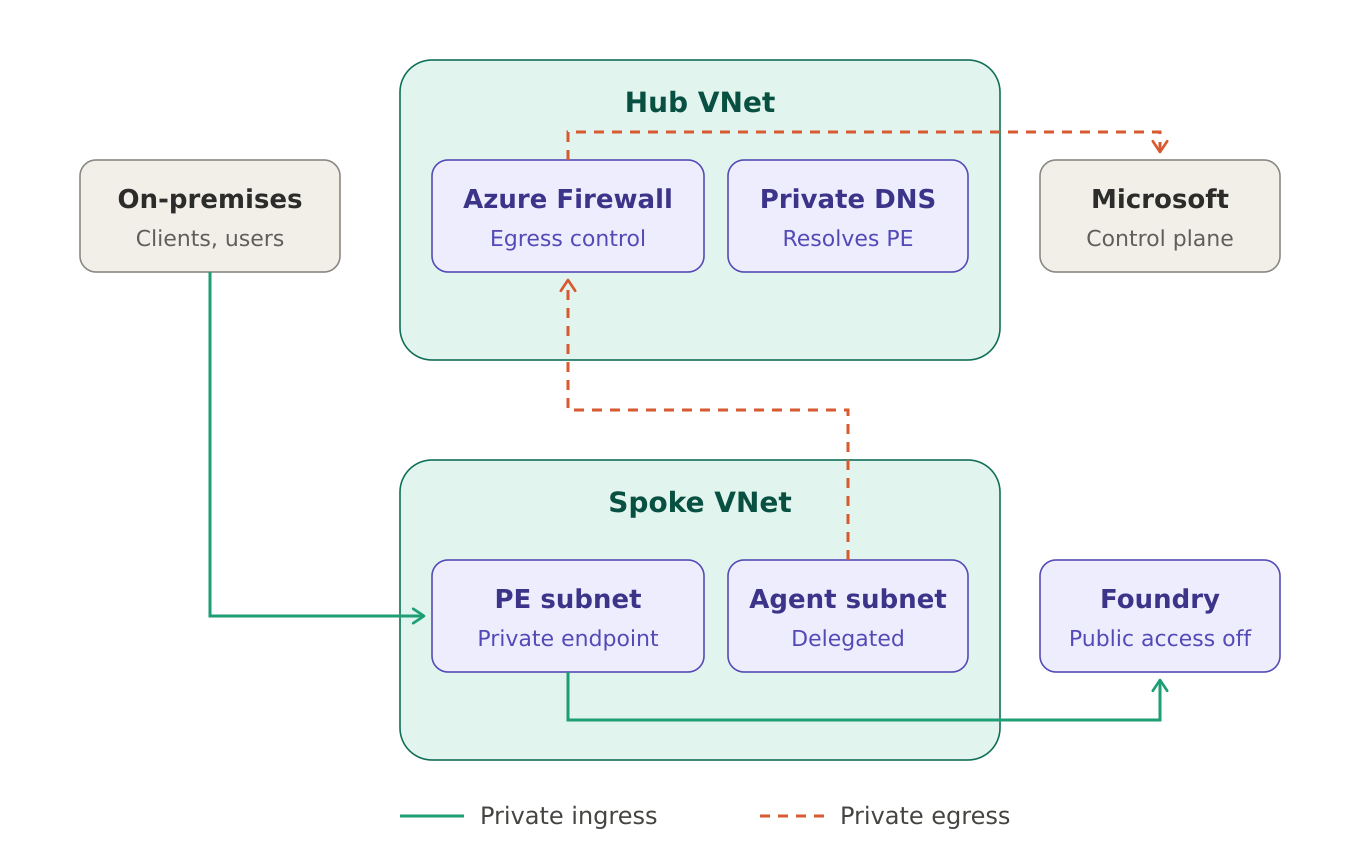
Ingress goes through a private endpoint, and egress goes through a delegated subnet routed through Azure Firewall.
DNS Zones
Leverage Azure Policy to automate A-record creation for private endpoints into their respective zones.
| Service | Private DNS zone(s) | Comment |
|---|---|---|
| Microsoft Foundry | privatelink.cognitiveservices.azure.comprivatelink.openai.azure.comprivatelink.services.ai.azure.com |
Covered in this post. A Foundry resource can expose all three endpoints; configure a zone for each one your workload uses. |
| Azure AI Search | privatelink.search.windows.net |
Not covered here. Commonly used with Foundry for retrieval/indexing (RAG). |
| Azure Cosmos DB | privatelink.documents.azure.com |
Not covered here. Commonly used for agent thread and conversation storage. |
| Azure Container Registry | privatelink.azurecr.io |
Not covered here. Commonly used for hosted agent images. |
| Azure Container Apps | privatelink.{regionName}.azurecontainerapps.io |
Not covered here. Only needed for a private endpoint into a Container Apps environment you host; the Foundry delegated agent subnet doesn't need it. |
Private ingress: private endpoint
The Foundry account has public network access disabled, and you need to create a private endpoint to allow access. The private endpoint targets the account, and projects under it use the same private endpoint. Users on the private network, for example corporate users, resolve the Foundry endpoint FQDNs to the private endpoint's IP. For on-premises users this only works if your DNS forwards the privatelink zones to Azure, for example through Azure DNS Private Resolver or conditional forwarders.
For traffic to reach the private endpoint, allow TCP 443 from your client ranges to the private endpoint IP on Azure Firewall (if traffic passes through it) and on the Network Security Group (NSG) of the users' subnet. NSG rules on the private endpoint subnet itself are only evaluated if private endpoint network policies are enabled on that subnet, which they aren't by default.
Private egress: delegated subnet
The Foundry account needs to be configured with a delegated subnet to Microsoft.App/environments. This ensures outbound calls from agents, such as most tool calls, go through the subnet. The subnet's traffic is forced to the firewall or NVA with the route table attached to the subnet, using a 0.0.0.0/0 route with next hop to the firewall's private IP.
Not every tool uses this path. Web search, Bing grounding and SharePoint tools use public egress managed by Microsoft, and bypass both the subnet and your firewall.
Microsoft states a minimum /27 and recommends a /24 subnet size on the delegated agent subnet, with one dedicated subnet per Foundry resource. A very important configuration step here is to choose the Standard agent setup, and not Basic, to allow network injection.
Firewall rules for control plane traffic
These are the rules used in this setup. All are outbound on 443, with an IP group containing the agent subnet ranges as the source. Service tags are used where one exists, and FQDNs where it doesn't.
| Rule | Type | Destination | Purpose |
|---|---|---|---|
| foundry-required-service-tags | Network, TCP 443 | AzureActiveDirectoryMicrosoftContainerRegistryAzureFrontDoor.FirstParty |
Entra ID and managed identity tokens, and container image pulls for the agent runtime |
| foundry-platform-binaries | Application, HTTPS 443 | packages.aks.azure.comacs-mirror.azureedge.net |
Kubernetes and CNI binaries for the container platform under the agents (no service tag exists) |
| foundry-managed-identity | Application, HTTPS 443 | *.identity.azure.net |
Managed identity token endpoint for agent runtimes |
| foundry-agent-service | Application, HTTPS 443 | *.infra.ai.azure.com<tenant-id>.08.tenant.api.powerplatform.com |
Agent Service endpoints and the tenant's Power Platform API used by agent tools |
Additional openings can be added as needed, for example for Application Insights.
NSG rules on the agent subnet
Outbound internet traffic is filtered by the firewall, so the NSG only needs to cover traffic to the private endpoints. Allow TCP 443 outbound from the agent subnet to the private endpoint subnet, so agents can reach Foundry and the services behind it.
Since NSG rules on the private endpoint subnet aren't evaluated by default, this rule on the agent subnet is where you control which private endpoints the agents can reach.
References
- Set up private networking for Foundry Agent Service
- Deep dive into Foundry Agent Service networking
- Deploy a hosted agent: firewall requirements
- Azure Container Apps integration with Azure Firewall
- Azure Private Endpoint private DNS zone values
- How to configure network isolation for Microsoft Foundry
- Manage network policies for private endpoints
- Azure service tags overview
Comments
Join the discussionNo comments yet. Be the first to comment.